The baby tracker built for both parents
Houseloop is a baby tracker two parents use at the same time. When one parent logs a feed, diaper, or nap in real time, the other parent gets a notification on their phone (for example "Dad logged feed 4.5 oz"). You can track bottle amounts in ounces, nursing by side, diapers, and multi-waking sleep. It is more than a tracker: it also handles night duty and parent recovery.


Try limited household task sharing free. Baby care and recurring routines require Plus. Eligible monthly subscribers can try Plus free for 7 days. Use it in your browser.
The other parent sees every log instantly
Log a feed, diaper, or nap in real time and your partner gets a push notification like "Dad logged feed (4.5 oz)". No screenshots, no "did you feed her yet" texts. Both phones stay in sync automatically, and this core sync is built in.
Track what actually matters, precisely
Bottle amounts in ounces, nursing by left or right side with per-side duration, pee and poo diaper counts, and multi-waking sleep sessions. Add growth, milestones, starting solids, and a milk or formula inventory with use-by dates.
More than a tracker: it shares the night
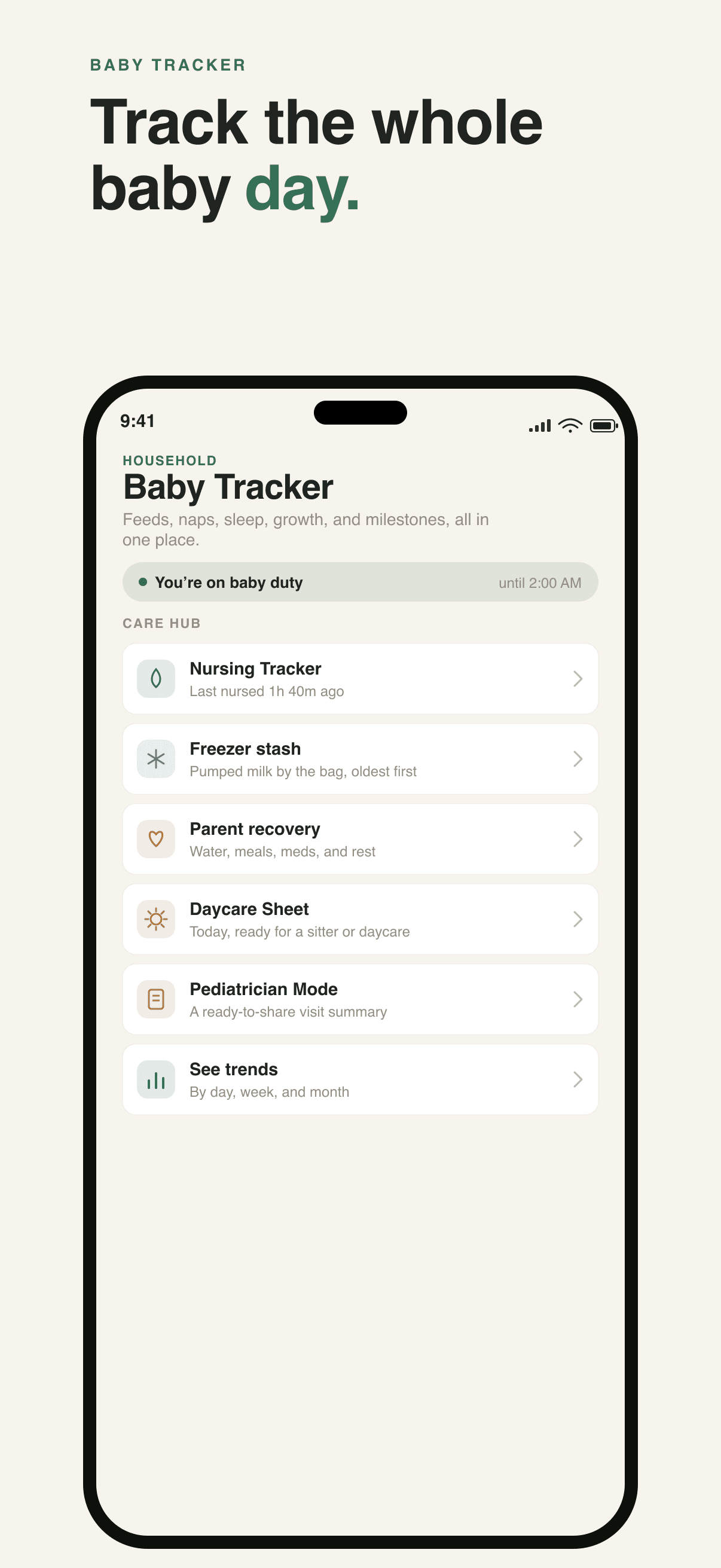
Baby Duty Autopilot routes the next feed reminder to whoever is on duty instead of waking the whole house. Two parents can alternate whole nights. Parent recovery lets you log water, meals, meds, and pumping, and "protect my nap" hands the baby off for two hours.
One app for the baby and the household
The same engine that logs feeds also runs your chores, reminders, and family notice board. Hand off a task and the reminders go to the assignee, not you. It is the follow-through app for the whole home, not just the nursery.
How do both parents set up the shared baby tracker?
Create your household in Houseloop, then invite your partner from Family. Each parent signs in with their own account and joins the same household. Open Baby Tracker and select the same baby on both devices. Baby tracking requires an active Plus subscription or eligible trial; one subscription covers the household, not one device.
Record one feed, then open the baby timeline on the other device to check that the entry is visible. Enable notifications on the installed iPhone or Android app if you want alerts for real-time entries. A back-dated entry is still a record, but does not send the same live notification. On Android, use the browser version today; do not expect native push behavior from an Android app that has not launched yet.
What can a partner or caregiver see?
Household members use their own accounts to participate in the shared household. For someone who only needs to read the baby updates, use the revocable read-only caregiver link rather than sharing your login. A read-only link is for viewing, not adding feeds or changing records. Only share it with the caregiver you intend to give access to, and revoke it when it is no longer needed.
The limited Free plan lets you try household task handoffs. It is not a permanently free baby tracker. Plus includes the shared baby log, nursing, sleep, growth, pumping, and reports. Check the purchase screen for the current local price and trial eligibility.
What can you track in Houseloop?
Houseloop covers the daily newborn log without making you tap through menus. For feeds, you can record bottle amounts in ounces or nursing by left and right side with the duration on each side. For diapers, you log pee and poo counts. For sleep, you capture full sessions including every night waking, not just a single start and stop time.
Beyond the daily log it also tracks growth, milestones, starting solids, vaccine schedules, and a milk or formula inventory with use-by dates so you know when to restock. A trends chart nets your baby wakings, counts wet diapers, and can switch to a 24-hour clock. Feed and diaper logging, nursing by side, partner notifications, sleep tracking, growth, milestones, and trends are all part of one plan that covers the whole household.
How does the real-time sync between parents work?
Both parents use their own accounts in the same household to see the shared baby timeline on the web, iPhone or Android. Real-time entries can also notify the other parent on the installed iPhone or Android app when notifications are enabled. Back-dated records appear in the timeline without the same live alert.
Two things to know: the live notification fires for real-time logs only, not entries you back-date, and the other parent needs the app installed with notifications turned on. Once both phones are set up, one person logging is enough for both of you to stay current.
Why is Houseloop more than a baby tracker?
Most trackers stop at recording data. Houseloop uses that same shared timeline to split the actual work. Baby Duty Autopilot lets you set who is on duty so the next feed reminder routes to that parent instead of waking everyone, and you can set recurring nightly shifts or have two parents alternate whole nights.
It also looks after the parents. Parent recovery lets you log water, meals, meds, pumping, and rest, and a "protect my nap" button hands the baby to your partner for two hours. When a caregiver is involved, a Daycare Sheet and a revocable read-only share link keep a sitter in the loop with no account required, and Pediatrician Mode turns your logs into a visit summary you can print or share.
Questions
Is Houseloop a baby tracker for both parents?
Yes. Both parents join the same household using their own accounts and see the shared baby timeline. Baby tracking requires Plus or an eligible trial. Real-time entries can notify the other parent on the installed iPhone or Android app when notifications are enabled.
Does the baby tracker cost money?
Shared baby tracking requires Houseloop Plus, and one subscription covers the household. The limited Free plan is for trying household task handoffs, not ongoing baby tracking. Eligible new monthly subscribers can try Plus free for 7 days; check the purchase screen for local prices and eligibility.
What can I track for my baby?
Bottle amounts in ounces, nursing by left or right side with per-side duration, pee and poo diaper counts, multi-waking sleep sessions, growth, milestones, starting solids, and a milk or formula inventory with use-by dates.
Do both parents get notified when I log a feed?
Yes, as long as the entry is logged in real time (not back-dated) and the other parent has the app installed with notifications enabled. They will see a message like "Dad logged feed (4.5 oz)" on their phone.
Does Houseloop work on iPhone and Android?
Yes. Houseloop runs on the web, iPhone and Android, with native apps on the App Store and Google Play. Shared baby tracking requires Plus or an eligible trial, and one subscription covers the whole household. Native push alerts described here apply to the installed iPhone or Android app with notifications enabled.
Keep reading
- Baby Tracker App for Both Parents: What "Shared" Actually Means
- A baby feeding tracker for both parents
- A baby sleep tracker built for real nights (and both parents)
- A newborn tracker for the fourth-trimester chaos
- A baby duty tracker that knows whose turn it is
- A Huckleberry alternative built for two parents, not one phone
- A baby tracker alternative built for two parents, not one diary
- A Baby Connect alternative for the baby and the whole household
Try shared baby care with Plus or an eligible trial. Log a feed and check the shared timeline together.
Works on web, iOS and Android. One Plus subscription covers the household. Check checkout for local prices and trial eligibility.